


Air Canada + Aeroplan
4.7819.00 Reviews
App Specs
- Version
- 5.77.0
- Updated On
- License
- Free
- Downloads
- 5,000,000+
- Developer
- Air Canada
- Categories
- Travel & Local
- Platform
- Android, iOS
Screenshots






 Analysis by AppCompare
I judge an airline app by what happens when plans are moving quickly: can I find the right trip, understand what needs attention, and get back to the airport details without digging through email? Air Canada’s travel app brings flight planning and Aeroplan account tasks together, which is useful if you already fly with the airline or collect its rewards. It is free, made by Air Canada, and sits in the Travel & Local category. The app has a 4.4 average from around 43,000 ratings and more than 5 million installs, so it is a well-established option rather than an obscure companion tool.
Where a connection makes the biggest difference
Searching for a flight is the point where a dependable internet connection matters most. You need current results to compare itineraries, review fares, and decide whether to pay with money or use Aeroplan points. I would do this part somewhere with a stable connection and enough time to check the details carefully, rather than trying to complete a booking while moving between weak public Wi-Fi spots.
That advice also applies to checking a changing itinerary. Flight status and travel updates are most useful when the phone can receive current information. I’d keep notifications enabled if I rely on the app during a trip, then open the itinerary itself when a message suggests something has changed. A notification is a prompt to check, not a reason to assume every detail of the journey is settled.
A useful travel companion, not a universal planner
The app makes the most sense when Air Canada is already part of your plans. If I were comparing several airlines for a complicated trip, I’d still use a broader travel search tool or check airline sites directly before settling on an itinerary. Those tools can be better for surveying the whole market; Air Canada’s app is more useful once I want to book with this airline and manage the resulting trip and Aeroplan activity in one place.
It is also a better fit for travelers who want their rewards balance close to their flight information. A person who rarely flies Air Canada and has no interest in Aeroplan may get little value from keeping a dedicated airline app installed. For someone who takes occasional trips with the carrier, the practical question is whether having booking and trip tasks together saves enough effort to justify another app on the phone.
Small habits that help on travel day
Before leaving home, I’d open the app while connected and review the booking, check-in options, and any current flight information. That gives me a chance to catch a mismatch between what I expect and what the itinerary shows while I still have time to investigate. I would also make sure I can sign in before reaching the airport; discovering a forgotten password in a crowded terminal is an avoidable source of stress.
For a realistic airport morning, imagine a traveler checking the trip over breakfast, then heading to the terminal with a bag and a phone in hand. The app can help with the airline-specific steps, but I would still keep the booking confirmation and any essential travel documents accessible in a way that does not depend on finding a strong signal at exactly the right moment. That is not a criticism unique to this app; it is sensible preparation whenever a phone is part of the travel plan.
Worth Reading Before You Choose

EA SPORTS FC Mobile 26 Is a Bigger Football Game, but It Takes Time

Flipboard Shows What News Apps Must Do Beyond the Feed

Switching to Android Auto Means Rethinking Your Driving Routine

Google Calendar Makes a Crowded Week Easier to Manage

Ludo King Makes the Most of the Minutes Between Plans

Baby Panda World Brings Quick Play to Modern Phones, but Its Game Library Feels Busy
What to expect when something goes wrong
Connectivity can be uneven in stations, terminals, and crowded boarding areas. If a page takes too long to load, I’d avoid repeatedly tapping through the same action, especially during a purchase or account change. I’d check the connection, reopen the relevant screen, and confirm whether the booking or action actually completed before trying again. That simple pause can prevent uncertainty about whether a request went through.
If a flight update arrives at a stressful moment, use the app to check the current trip details and then follow the airline’s instructions for the situation. For anything that cannot be resolved in the app, an airport staff member or the airline’s available support channel may be the more direct route. The app is handy for self-service, but it should not be treated as a substitute for assistance when a disruption needs a person to assess the circumstances.
I would also be cautious about relying on one screen as the only record of a trip. Keep the important booking information available, and check that the app is showing the correct reservation after signing in. If the phone battery is low or data access is uncertain, those preparations matter more than any elegant interface.
Data use and practical trade-offs
Flight searches, account information, and trip updates naturally involve using a network, so I’d do longer planning sessions on a trusted connection when convenient. When traveling, I would limit needless refreshes and open the app for a specific task—checking a reservation, reviewing a flight update, or handling a booking—rather than leaving it as a constant source of activity. That is a practical way to keep mobile use intentional without guessing how much data a particular screen consumes.
My main trade-off is that an airline’s own app is focused by design. It can bring Air Canada bookings and Aeroplan tasks together, but it is not the place I’d rely on to compare every carrier or organize every unrelated part of a trip. If you are loyal to Air Canada, that focus is a strength. If your priority is choosing among airlines first, a general search service is a better starting point, with this app becoming useful after you decide to fly with Air Canada.
Air Canada’s app is free and rated for everyone, and it was released on December 15, 2015. Version 5.74.1 is the current version, with iOS 12 listed as the minimum operating system requirement. I’d check that requirement before installing on an older Apple device. The 4.4 average and substantial user base suggest that many travelers find it useful, but neither figure can tell you whether its workflow suits your own travel habits.
Getting Started with Air Canada + Aeroplan
First things first, downloading the app is as straightforward as it gets. Available on both Android and iOS, it’s a quick install from your respective app store. Once you've got it on your device, the initial setup is pretty user-friendly. You’ll need to log in with your Aeroplan account, or create one if you haven’t already. Trust me, it’s worth the few minutes it takes.
What struck me right away was the sleek design. The interface is clean and intuitive, which is exactly what you need when you’re trying to book a last-minute flight or check your points balance while on the go. Everything is well-organized, and you won’t find yourself lost in a maze of menus.
Booking Flights Made Easy
One of the standout features of the Air Canada + Aeroplan app is how it simplifies flight bookings. You can search for flights, compare prices, and book directly through the app. The process is seamless, and you even get to choose your seat right from your phone. No more waiting in line or navigating clunky websites.
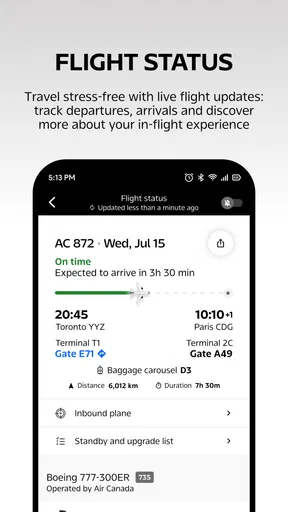
I found the filters particularly helpful. Whether you’re looking for a specific class, a direct flight, or trying to use your Aeroplan points, you can tailor your search to match your exact needs. Plus, the app keeps you updated with real-time notifications about your flight status. So, you'll know right away if there are any delays or gate changes.
Managing Your Aeroplan Points
If you’re like me and love collecting points, you’ll appreciate how the app integrates your Aeroplan account. You can easily check your balance, see your recent transactions, and even redeem points for flights or upgrades. It’s all right there in the palm of your hand.
The app also provides suggestions on how to maximize your points, which is a nice touch if you’re trying to get the most out of your rewards. I found the loyalty program section particularly insightful, as it offers tips and tricks to keep those points racking up.
Additional Features Worth Mentioning
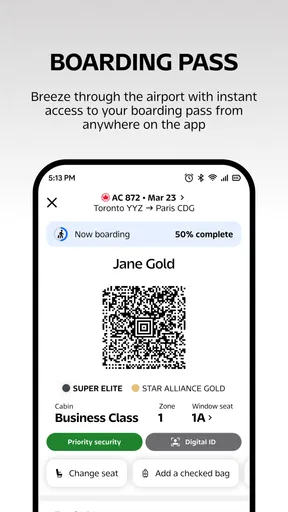
Beyond flights and points, the app also offers other handy features. For instance, you can check-in directly through the app, saving you time at the airport. The in-app boarding pass is a lifesaver, especially when you’re juggling bags and don’t want to fumble around for a paper ticket.
There’s also a concierge service available for premium members. If you’re flying business class or higher, you can access this service for personalized assistance. While I didn’t get to test this feature personally, I’ve heard rave reviews from fellow travelers who have.
Another cool feature is the ability to track your baggage. You can see where your bags are at every step of your journey, which adds a layer of peace of mind, especially when you’re traveling internationally.
Final Thoughts on Air Canada + Aeroplan
All in all, the Air Canada + Aeroplan app is a must-have for anyone who flies with Air Canada or is part of the Aeroplan program. It brings everything you need into one convenient app, making it easier to manage your travel plans and rewards. The user experience is top-notch, and the range of features makes it a powerful tool for both casual and frequent travelers.
If you haven’t downloaded it yet, give it a shot. It’s like having a personal travel assistant right in your pocket, ready to help you make the most of your trips. Whether you're booking a flight, checking in, or managing your points, this app has got you covered.
My connectivity verdict
I see the app as a focused airline companion, not a complete travel organizer. Its strongest case is for someone who books Air Canada flights and wants booking, check-in, flight information, and Aeroplan tasks close together. The practical payoff is greatest when you prepare before leaving, sign in successfully, and use it for specific airline tasks rather than expecting it to replace every travel service on your phone.
For a traveler who switches carriers often, prefers to compare a wide range of routes in one place, or rarely uses Aeroplan, I would start elsewhere and install this only when an Air Canada trip makes it worthwhile. For a regular customer, the combination is convenient; just keep a sensible backup of essential trip details and remember that network access can shape what you can do at a given moment. That balance is why I’d recommend it to Air Canada flyers while still treating it as one useful tool in a broader travel routine.
Pros
- User-friendly interface for easy navigation.
- Seamless flight booking experience.
- Real-time flight status updates.
- Integrated Aeroplan rewards tracking.
- Secure payment options.
Cons
- Occasional app crashes reported.
- Limited customer support options.
- Some features require internet access.
- Frequent updates can be large.
- Regional restrictions on some services.
FAQs for Air Canada + Aeroplan
What features does the Air Canada + Aeroplan app offer?
The Air Canada + Aeroplan app provides a comprehensive suite of features for travelers. You can book flights, manage reservations, check in, and receive real-time flight updates. Additionally, it integrates your Aeroplan account, allowing you to track points, access exclusive offers, and redeem rewards directly through the app.
Is the Air Canada + Aeroplan app user-friendly?
Yes, the app is designed with user experience in mind. It has an intuitive interface, making it easy to navigate through booking processes, manage your itinerary, and access Aeroplan benefits. The app also supports multiple languages and offers customer support, enhancing overall usability.
How secure is my information on the Air Canada + Aeroplan app?
The app prioritizes user security by employing robust encryption methods to protect personal and financial information. It follows industry-standard protocols to ensure data security and privacy. Additionally, users are encouraged to enable biometric authentication for added protection when accessing their accounts.
Can I manage multiple Aeroplan accounts on the app?
Currently, the app supports only one Aeroplan account per login session. However, users can log out and switch accounts if needed. For families or multiple users, each person should ideally have their own account to streamline the management of points and bookings.
Does the app require an internet connection to function?
While the app provides basic offline functionality, such as viewing previously accessed itineraries, a stable internet connection is required for most features. This includes booking flights, checking in, receiving real-time updates, and accessing your Aeroplan account for the latest information and offers.


